UI Frameworks
18 Feb 2026
My Experience with UI Frameworks
Over the past few weeks, I have become familiar with UI Frameworks using HTML, CSS, and Bootstrap 5. I am a complete newbie with all of these frameworks, so my outlook may differ with someone who has experience with the frameworks. For me it seemed like a whole new programming language that needed to be learned. The use of classes was a new experience that was easily picked up on. In this essay, I discuss my experiences in the usage of UI frameworks.
The start of the UI Frameworks began with learning and implementing HTML and CSS. As a beginner, this was an easier task to learn than Bootstrap. HTML would hold all of your classes and text, while CSS would be used for the styling of the page. I found that this method to be easier than its expansion with Bootstrap. Using CSS I could do a quick search for the type of styling that I was trying to achieve. The simplicity did come with some fallbacks. You would have to provide code to both the CSS and HTML in order to add text and style the text. Learning HTML and CSS was relatively straight forward and only had a slight learning curve.
Bootstrap is built with CSS allowing the user to style the webpage without needing a CSS file. While this was similar to CSS, the use of classes did provide a slight challenge for designing the page. Bootstrap uses prebuilt classes from CSS. I found that Bootstrap has a tremendous amount of classes and the challenge was finding the correct one I wanted to use. Provided with more experience, I can see the potential of using Bootstrap rather than CSS to be beneficial by allowing the user to basically build an entire HTML without the need for CSS. This would allow all of the webpage to be stored within a single HTML, without the need for a CSS.
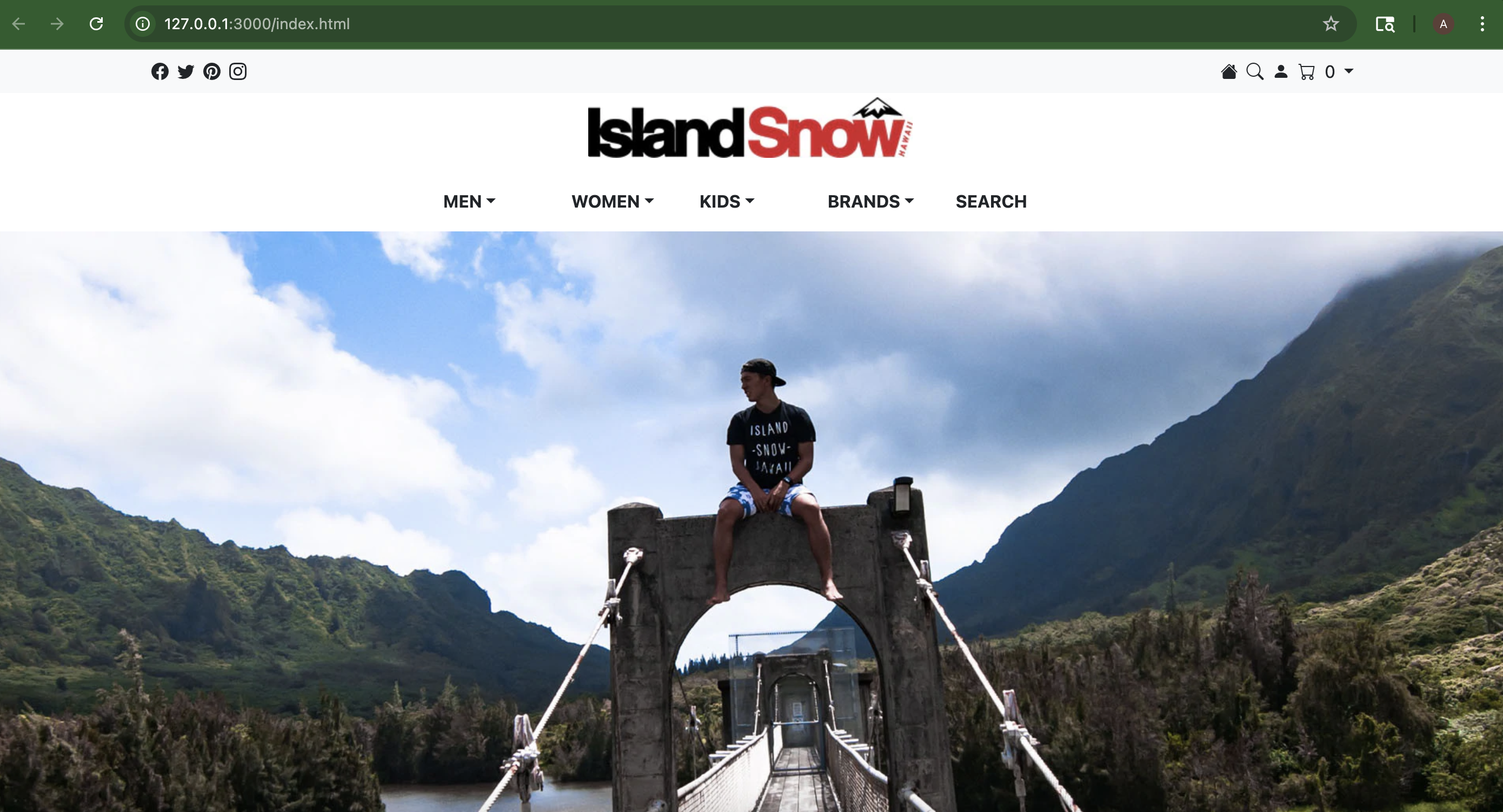
We were tasked to complete the Island Snow website while using mostly Bootstrap. A sample image of the webpage design will be placed below along with some code. I was able to effectively and successfully able recreate the design using Bootstrap within the alloted amount of time.
<div class="navbar bg-light">
            <div class="container">
                <ul class="nav">
                    <li class="nav-item"><i class="bi bi-facebook p-1"></i></li>
                    <li class="nav-item"><i class="bi bi-twitter p-1"></i></li>
                    <li class="nav-item"><i class="bi bi-pinterest p-1"></i></li>
                    <li class="nav-item"><i class="bi bi-instagram p-1"></i></li>
                </ul>
                <ul class="nav justify-content-end">
                    <li class="nav-item"><i class="bi bi-house-fill p-1"></i></li>
                    <li class="nav-item"><i class="bi bi-search p-1"></i></li>
                    <li class="nav-item"><i class="bi bi-person-fill p-1"></i></li>
                    <div class="nav-item dropdown">
                        <div class="dropdown-toggle" href="#" id="navbarDarkDropdownMenuLink" role="button" data-bs-toggle="dropdown" aria-expanded="false">
                        <i class="bi bi-cart p-1"></i> 0
                        </div>
                        <ul class="dropdown-menu dropdown-menu-dark" aria-labelledby="navbarDarkDropdownMenuLink">
                            <li>Your cart is empty</li>
                        </ul>
                    </div>
                </ul>
            </div>
        </div>
Sample code of how the NavBar was designed without the use of the CSS file.
footer{
    background-color: #292929;
    color: white;
}
The CSS file showing a minimal amount of styling needed. This piece of code was the only code in the CSS file due to that fact that Bootstrap was able to handle the rest.
In comparison, the webpage was built mostly with Bootstrap and the fine tuning was completed with CSS. Thus, relying mostly on Bootstrap rather than CSS. Increasing the efficiency that I could work at by not needing to change files to the CSS and able to the HTML.
Overall, with being new to the frameworks experience I did enjoy working with HTML, CSS, and Bootstrap 5. After the completion of a few experiences or WODs, I was able to get a grasp on using UI Frameworks. In my findings, the bulk of the website can be completed with Bootstrap’s classes without the need for a CSS file. Using Bootstrap may require more learing and experience, but its potential is much worth it. While there is still much to learn, I now feel more confident working with frameworks. I am looking forward to learning much more and how I can expand my knowledge in HTML, CSS, and Bootstrap 5.